Accessibility
Games built on Aegis2D should be playable by people with motor, audio-visual or cognitive disabilities. This page lists, for each category, what the engine provides, why, and how a game uses it. Each option is checked by unit tests, and most also end to end on the real window or audio output.
At a glance
| Category | Need | Option | Engine | Ticket |
|---|---|---|---|---|
| Motor | Cannot reach or press some keys, other layout, switch device | Remappable key bindings | platform::ActionMap, platform::KeyCapture |
#51 |
| Motor | Cannot hold a key down | Auto-fire | platform::LatchedAction |
#57 |
| Motor | Cannot use a keyboard, plays with a gamepad or an adaptive controller | Gamepad on the same actions, buttons remappable | platform::Gamepad, platform::ActionMap |
#92 |
| Audio-visual: hearing | Hearing loss, tinnitus, sensitivity to sound | Master, music and effects volumes | audio::Volumes, audio::AudioDevice::set_volumes() |
#53 |
| Audio-visual: hearing | Deaf or hard of hearing, playing muted | On-screen cues for important sounds | render::SoundCues |
#56 |
| Audio-visual: vision | Color blindness, grayscale screen | Colorblind-safe player colors with a shape marker | render::player_styles, render::marker_image() |
#52 |
| Audio-visual: vision | Low vision, playing far from the screen | Scalable HUD and menu text, 100% to 200% | render::TextSize, render::flow_layout(), render::BitmapFont::wrap() |
#55 |
| Audio-visual: vision | Photosensitive epilepsy, motion sickness | Option to turn off screen flashes and shake | render::ScreenEffects, render::EffectSettings |
#54 |
| Cognitive | Remembering the controls, knowing what to do | Controls reminder and goal on the connect screen | platform::control_lines(), render::draw_controls() |
#58 |
| Cognitive | Fewer things to handle at once, settings that are never lost | Auto-fire, defaults restored in one call, settings that never block the game | see Cognitive |
Settings
Every option the player changes goes to one settings file in their own folder
(platform::settings_dir()), outside the game folder, so it is set once and survives
restarts and updates. The game reads it at start with platform::read_settings(), which
never fails: a missing file is a first start, and a broken one is logged and replaced at the
next save. Each option keeps its default when its value is missing or invalid.
{
    "input": {
        "up": ["Up", "W"],
        "fire": ["Enter"]
    },
    "gamepad": {
        "fire": ["South", "RightShoulder"]
    },
    "audio": {
        "master": 1.0,
        "music": 0.3,
        "effects": 1.0
    },
    "accessibility": {
        "auto_fire": true,
        "text_size": 1.5,
        "sound_cues": true,
        "flashes": false,
        "shake": false
    }
}
const auto file = platform::settings_dir("Aegis2D", "RType") / "settings.json";
const auto settings = platform::read_settings(file);
actions.load(settings, "input");                       // key bindings
actions.load_buttons(settings, "gamepad");             // gamepad bindings
volumes.load(settings, "audio");                       // then audio.set_volumes(volumes)
auto_fire.load(settings, "accessibility.auto_fire");
text_size.load(settings, "accessibility.text_size");   // then text_size.apply(style)
cues.load(settings, "accessibility.sound_cues");
effects_choice.load(settings, "accessibility");        // then effects.set_settings(...)

// When the player changes an option in a menu:
auto updated = platform::read_settings(file);          // keeps the other options
volumes.save(updated, "audio");
updated.save(file);                                    // atomic: never half written
Motor
Remappable key bindings
In place (#51).
Fixed controls exclude players who cannot reach or hold some keys: one hand on the keyboard, limited finger movement, a single-switch device that emits one key, or a different keyboard layout. Every action can be bound to any key, and to several keys.
- Gameplay reads actions (
platform::ActionMap), never raw keys, so changing a key changes no gameplay code. - A settings menu binds the next key pressed with
platform::KeyCapture("Press a key for Fire"); Escape cancels. A key drives one action: binding it takes it from the other action, and the menu is told which one, to show it as unbound. - Keys follow the player's layout: on AZERTY, the key labeled
ZisZ. Their names in the settings file are readable and can be edited by hand. - The bindings are written to the player's settings file at each change and read back at start. A missing, broken or partial file never blocks the game: unreadable entries keep the default keys, and actions added by an update get their default keys.
- Restoring the default keys is one call (
ActionMap::reset_all()).
{
    "input": {
        "up": ["Up", "W"],
        "fire": ["Enter"]
    }
}
aegis2d_example_key_bindings shows the whole loop (see
Getting started).
Gamepad
In place (#92).
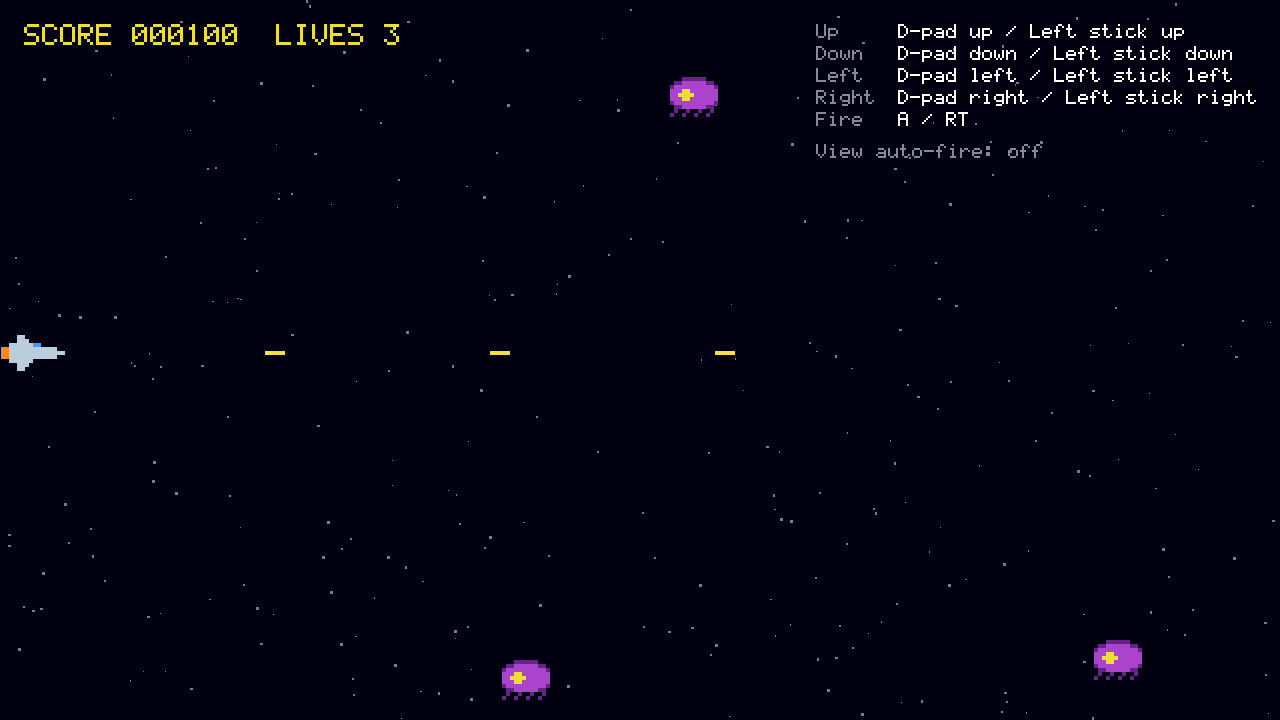
Some players cannot use a keyboard comfortably, or play with a controller made for them: the Xbox Adaptive Controller and similar devices present themselves as a gamepad. Every action can be triggered from a gamepad as well as from the keyboard.
- The pad drives the same actions as the keys (
platform::ActionMap): the D-pad or the left stick moves the ship, A (Cross on PlayStation, B on Nintendo pads) or the right trigger fires. Gameplay does not know which one the player uses, and both work at once. - Any button, trigger or stick direction can be bound to any action, as keys are
(
ActionMap::bind(action, GamepadButton)); a button drives one action. The buttons are saved in the player's settings file next to the keys, under their own section, and restored with the defaults byActionMap::reset_all(). - A stick direction counts once the stick is pushed half way, and is released only below a third of the way, so a trembling hand near the edge does not make the ship flicker between moving and stopping.
- Any pad plugged in drives the player, even while the game runs; one unplugged releases its buttons, so the ship does not keep moving or firing.
- Auto-fire (below) works with the pad too, and the controls reminder shows the buttons as printed on the player's pad ("A / RT", "Cross / R2").
{
    "gamepad": {
        "up": ["DpadUp", "LeftStickUp"],
        "fire": ["South", "RightShoulder"]
    }
}
Auto-fire
In place (#57).
A shoot 'em up asks the player to hold the fire key for most of the game, which some players cannot do: limited strength or endurance, tremor, pain, or a switch or mouth stick that sends single presses.
- With auto-fire on (
platform::LatchedAction), one press of fire starts firing and the next press stops it; the weapon keeps its rate (four shots a second) meanwhile. - With auto-fire off, fire follows its key as usual.
- It works with any key the player bound to fire (see above), and the game can release it when the ship dies or the game pauses.
- The option is kept in the player's settings file, next to the other options.
{
    "accessibility": {
        "auto_fire": true
    }
}
Audio-visual
Hearing: master, music and effects volumes
In place (#53).
Players with partial hearing loss, tinnitus or sensitivity to sound need to set the music and the effects apart. Some need to hear the effects, which carry gameplay cues, over the music. Others play with the music off, or with everything quieter. A single volume cannot serve them all.
- Three sliders (
audio::Volumes): master, music and effects, from 0 to 1. The music and effects sliders change only their own channel, and the master slider changes both. Tests measure this on the real audio output. - Changes apply at once, to the sounds already playing too (
AudioDevice::set_volumes()). - Equal slider steps sound like equal changes of loudness: the gain is the square of the slider (half way is about -12 dB).
- The sliders are kept in the player's settings file next to the key bindings, and read back at start; a missing or invalid value keeps its default.
{
    "audio": {
        "master": 1.0,
        "music": 0.3,
        "effects": 1.0
    }
}
Hearing: on-screen cues for important sounds
In place (#56).
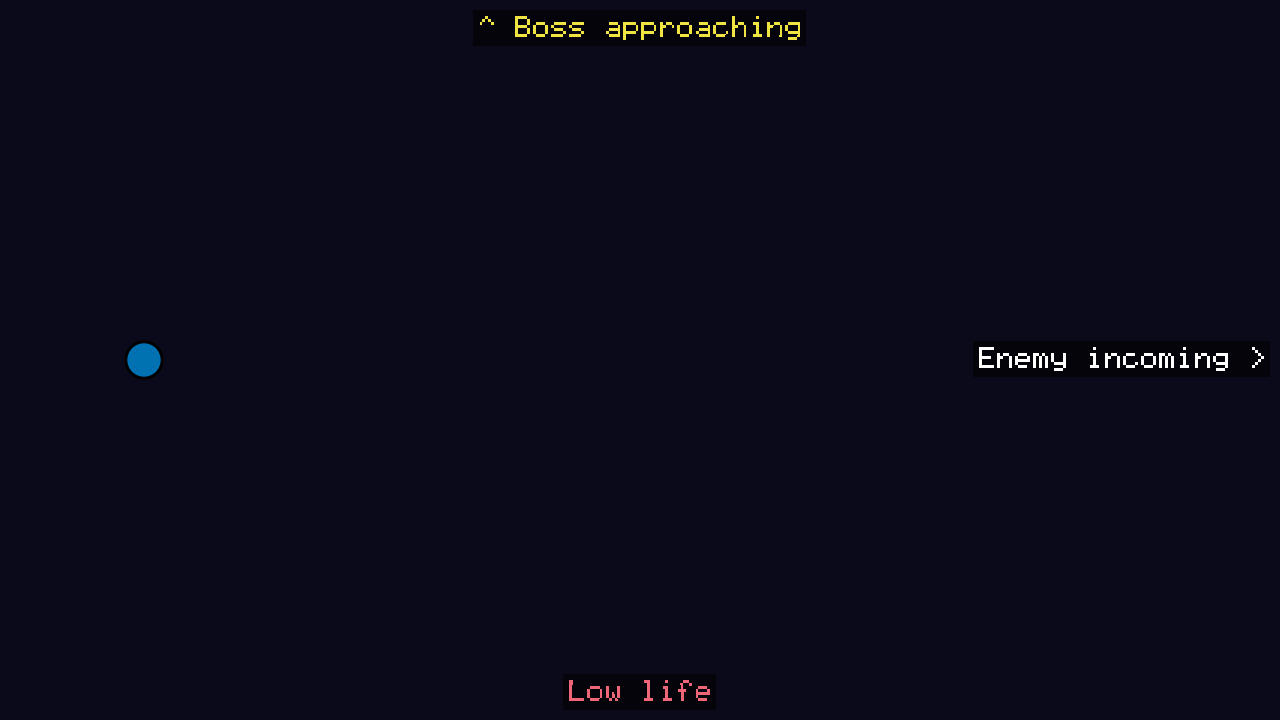
Sounds tell the player things they need to react to: an enemy coming in, a boss, low life. Deaf and hard-of-hearing players miss them, and so does anyone playing muted. With this option on, every important sound is also shown.
- The game calls
render::SoundCues::show()each time it plays an important sound, whatever the volume, with a short caption and, when the sound has one, its source. When the sound comes from a gameplay event (audio::EventSounds), the cue listens to the same event on the bus (events.subscribe<ecs::Explosion>(...)). - A cue with a source is drawn on the screen edge nearest to it, with an arrow toward it ("Enemy incoming >" on the right edge, at the enemy's height). A cue without one is a caption at the bottom center.
- Cues fade out after about two seconds and never overlap; a sound played again refreshes its cue instead of stacking another. They sit on a dark backdrop and are drawn in the style the game gives, so they follow the player's text size (see below).
- A test plays ten seconds of a stage with the volume at zero: each important sound stays on screen for about two seconds. End to end, the example records a silent output while the enemy, the boss and low life are all shown.
- Off by default; the choice is kept in the player's settings file.
Vision: colorblind-safe player colors with a shape marker
In place (#52).
About one man in twelve does not tell red from green well. Some players see no color at
all, or play on a grayscale screen. A player who cannot tell their ship from a teammate's
cannot play. So each player has a color and a shape (render::player_styles), and the
shape tells the players apart even without any color.
| Player | Color | Source | Marker | Lightness in grayscale (L*) | Contrast on #0A0A1A |
|---|---|---|---|---|---|
| 1 | blue #0072B2 |
Okabe-Ito | circle | 46 | 3.8:1 |
| 2 | red #EE6677 |
Paul Tol | triangle | 61 | 6.3:1 |
| 3 | yellow #F0E442 |
Okabe-Ito | square | 89 | 14.8:1 |
| 4 | cyan #66CCEE |
Paul Tol | diamond | 77 | 10.7:1 |
- The colors come from palettes designed for color blindness. Any two stay apart (CIE76
ΔE of 30 or more) for typical vision and when simulated for protanopia, deuteranopia
and tritanopia (
render::simulate()). - In grayscale, their lightness differs by at least 10 L*, so the four players stay distinct.
- On a dark background, each color has a contrast of at least 3:1, the WCAG minimum for graphical objects.
- Unit tests check all of this, so a change of palette that breaks it fails the build.
- The marker (
render::marker_image()) is a white shape outlined in black. Tinted with the player's color, the outline keeps it readable on dark backgrounds and on explosions alike. The game draws it next to the ship and on the HUD, with the player's number written next to it (render::BitmapFont), as inaegis2d_example_hud.
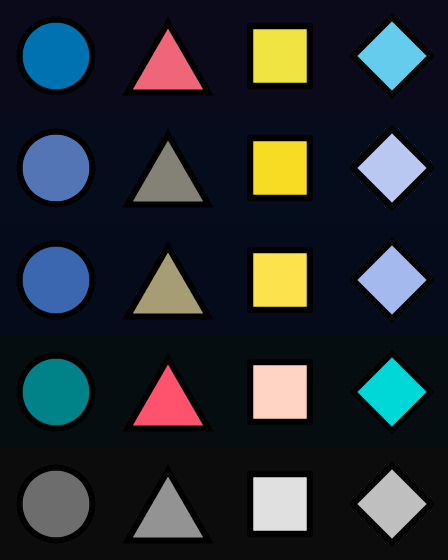
Rows from the top: typical vision, protanopia, deuteranopia, tritanopia and grayscale,
simulated with render::simulate() from the engine's own marker images.
aegis2d_example_hud shows it live: F3 draws the whole HUD as seen with each color
vision in turn, and --color-vision achromatopsia starts in grayscale.
aegis2d_example_players does the same with four ships in play, each tinted with its
player's color and followed by its marker and number.
Vision: scalable HUD and menu text
In place (#55).
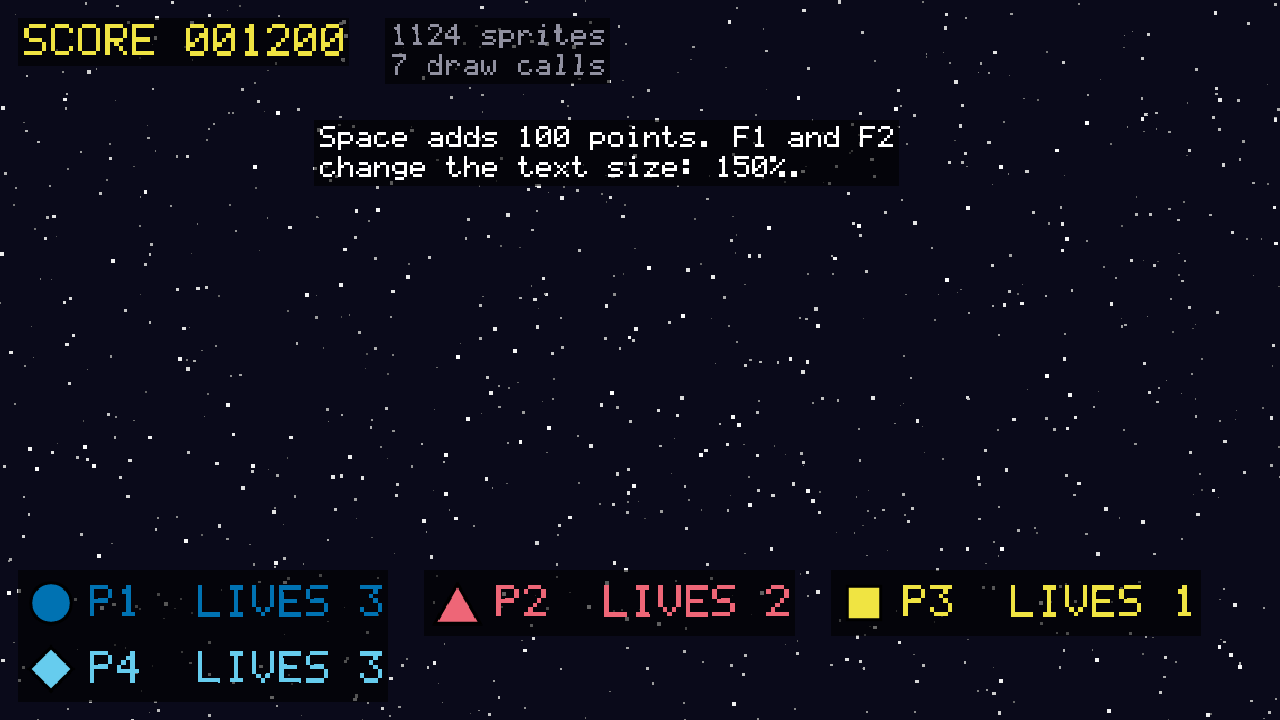
Players with low vision, or playing on a television far from the sofa, cannot read text drawn for a desk monitor. They can make every HUD and menu text larger, from 100% to 200% by steps of 25%.
- The game multiplies each text style by the player's size (
render::TextSize::apply()). - Larger text must not overlap. HUD items are laid out with
render::flow_layout(), which moves an item to the next row when it no longer fits. Long texts are wrapped to their width withrender::BitmapFont::wrap(). - A test lays out a four-player HUD (score, statistics, a panel per player and a menu paragraph) at every size from 100% to 200%. No two items overlap, every item stays on the screen, and every glyph stays in its item. At 150%, the big HUD text is 36 pixels high.
- Text drawn over the game is easier to read on a dark backdrop, as in
aegis2d_example_hud. The size is kept in the player's settings file.
Vision: option to turn off screen flashes and shake
In place (#54).
Flashing light can trigger seizures in players with photosensitive epilepsy, and a shaking screen causes motion sickness and is hard to follow for some players. Explosions use both, so the player can turn them off.
- Flashes and shake go through
render::ScreenEffects. With the option on (EffectSettingsflashesandshakeset to false), explosions ask for them but nothing is drawn and the camera does not move. Turning the option on during a flash stops it at once. - Even with flashes on, at most three flashes start in any second, the limit of WCAG 2.3.1. A burst of explosions cannot flash faster than that.
- The choice is kept in the player's settings file and read back at start.
{
    "accessibility": {
        "flashes": false,
        "shake": false
    }
}
aegis2d_example_effects shows it: the screen flashes on an explosion, and stays dark
once F1 has turned the option on.
Cognitive
Players with attention, memory or processing difficulties, and players who tire quickly, are helped by fewer things to handle at once and by settings that are never lost or confusing. The engine provides:
- Auto-fire (see Motor): firing no longer needs a key held for the whole game, which leaves only the movement to handle.
- Named actions with readable keys: actions have names (
up,fire) and keys have plain names (Space,LeftShift,Keypad5,platform::key_name()), so a menu or a reminder can show the controls in words. - Settings that never block the game: a missing, broken or partial settings file gives the default options instead of an error, and each option falls back to its default on its own.
- One call back to the defaults:
ActionMap::reset_all()restores every key, so a player who is lost in their bindings can start again. - No sensory overload on demand: flashes and shake can be turned off (see Vision), and the music can be lowered or muted while the effects stay audible.
Controls reminder on the connect screen
In place (#58).
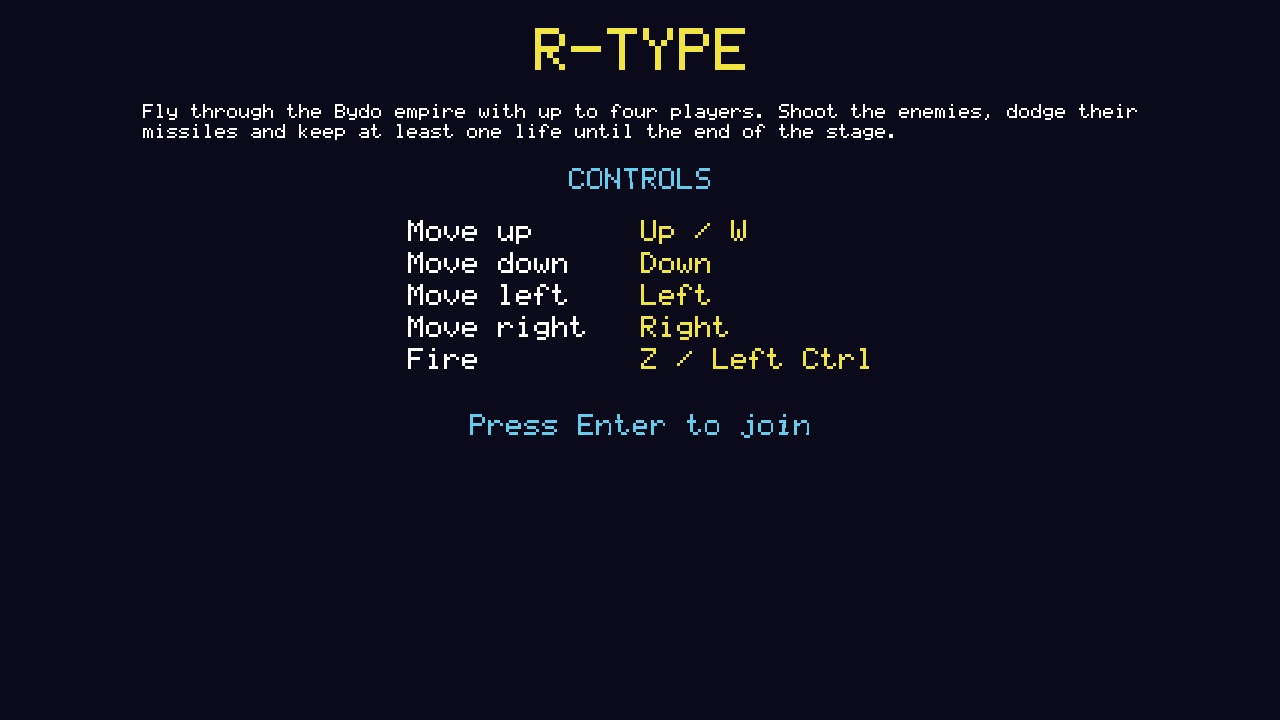
Before joining, a player sees the goal of the game and their controls, so nobody has to remember them or guess them. This helps players with memory or attention difficulties, new players, and players who changed their keys.
- The controls come from the bindings in use (
platform::control_lines()), so the screen lists the player's own keys after a remap, not the defaults: "Fire Z / Left Ctrl". - Keys have names in words ("Left Shift", "Keypad 5",
platform::key_label()), and an action without a key says "not bound". - With a gamepad plugged in, a game lists the pad's buttons instead, as printed on that
pad: "Fire A / RT" on an Xbox pad, "Cross / R2" on a PlayStation pad
(
platform::control_lines(actions, style)), asaegis2d_example_shipdoes. render::draw_controls()draws them as a table: actions in one column, their keys aligned in the next. The table follows the player's text size, and the goal is wrapped to the screen.
Captions for important sounds (see Hearing) also help players who do not catch what a sound means.